Showing posts with label LAPS. Show all posts

Friday, February 14, 2020

How to view LAPS password in PowerShell

Installtion
PS> Install-Module -Name ActiveDirectory.Toolbox
Usage

PS> Import-Module ActiveDirectory.Toolbox


Commands

Get-ADComputerLAPSInfo [[-ComputerName] <string[]>]

or

Get-ADComputerLAPS [[-ComputerName] <string[]>]


Link for download


Note:
#Requires -Modules ActiveDirectory

Wednesday, November 28, 2018

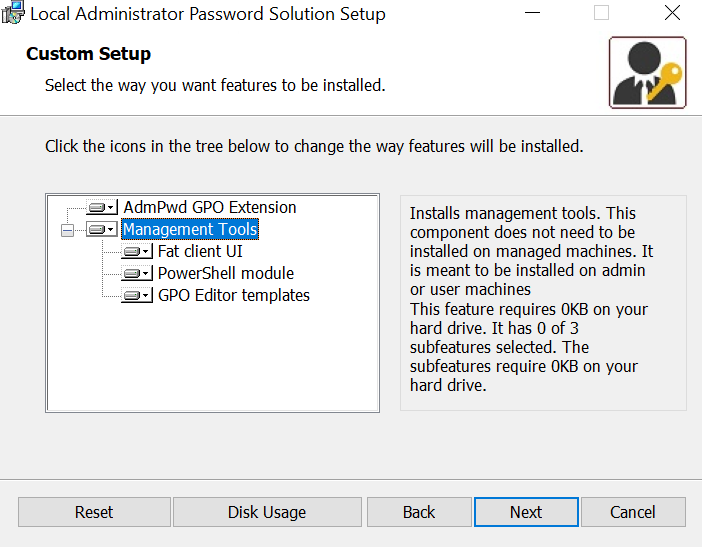
Setup LAPS on Administrator Workstation

When you install LAPS program on a computer where you want the ability to easily retrieve the password just select the Management Tools


Wednesday, July 11, 2018

PowerShell Script: Get LAPS Password Information from Active Directory

A small script for export Computers LAPS Password information from Active Directory to csv file.
Script generates a CSV file with computer names and LAPS Passwords.
    ComputerName;OperatingSystem;Password;PasswordExpTime;DistinguishedName
Requirement of the script:
   - Active Directory PowerShell Module
   - Needed rights to view AD LAPS Attributes: ms-Mcs-AdmPwd, ms-Mcs-AdmPwdExpirationTime
  
Example of usage:
[PS].\Get-ADComputers-LAPS-Password.ps1
[PS].\Get-ADComputers-LAPS-Password.ps1 -OU "OU=Computers,OU=IT Department,DC=myDomain,DC=com"

Links for download
PowerShell Gallery | Get-ADComputers-LAPS-Password
GitHub | Get-ADComputers-LAPS-Password.ps1
Get-ADComputers-LAPS-Password.zip