Wednesday, November 28, 2018
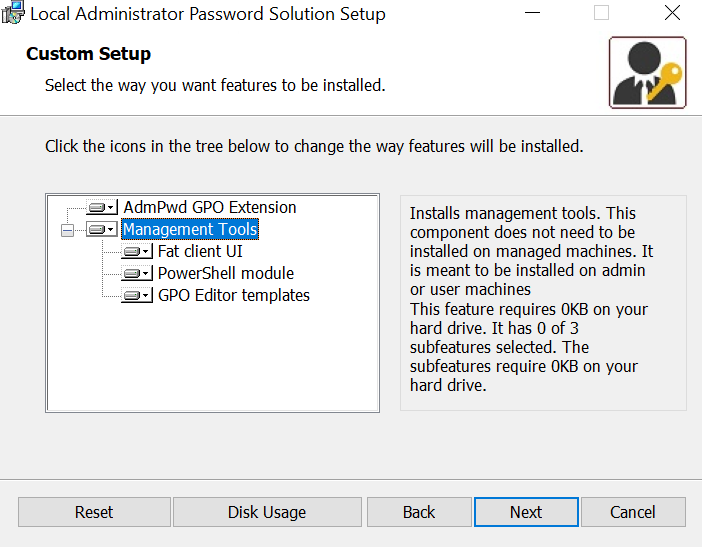
Setup LAPS on Administrator Workstation
When you install LAPS program on a computer where you want the ability to easily retrieve the password just select the Management Tools

Tuesday, November 20, 2018
Link Exchange Online Mailbox with Exchange On-premise
One of
my customer have a hybrid exchange
environment.
For a new
user needs to create AD account and Mailbox on Exchange on-premise.
After
creating mailbox and if is needed (depends on Company Police), user mailbox
moving to the Exchange Online (Office 365).
It is
important to be sure that the right routing address is set, user listed in
Address Book and all works fine.


In this case some mailboxes was created wrong.
That
means, that there was a AD user on-premise and mailbox was created directly in
the Exchange Online.
When
on-premise user tried to send message to user whose mailbox was created in
Exchange Online directly, he got message:

Monday, November 19, 2018
Connect to Exchange Online PowerShell
Exchange Online PowerShell allows you to manage your Exchange Online settings from the command line.
1. On your local computer, open Windows PowerShell and run the following command.
In the Windows PowerShell Credential Request dialog box, type your account and password, and then click OK.

2. Run the following command.
$Session = New-PSSession -ConfigurationName Microsoft.Exchange -ConnectionUri https://outlook.office365.com/powershell-liveid/ -Credential $UserCredential -Authentication Basic -AllowRedirection
3. Run the following command.
Import-PSSession $Session -DisableNameChecking

1. On your local computer, open Windows PowerShell and run the following command.
$UserCredential = Get-Credential
In the Windows PowerShell Credential Request dialog box, type your account and password, and then click OK.

2. Run the following command.
$Session = New-PSSession -ConfigurationName Microsoft.Exchange -ConnectionUri https://outlook.office365.com/powershell-liveid/ -Credential $UserCredential -Authentication Basic -AllowRedirection
3. Run the following command.
Import-PSSession $Session -DisableNameChecking

Monday, October 22, 2018
Windows Tips: How to make sure a downloaded .iso matches a hash value?
Install the Microsoft File Checksum Integrity Verifier tool from
Then using fciv.exe with Command Prompt:
fciv.exe -sha1 filename.iso
Saturday, August 11, 2018
PowerShell Script: Get AD Domain and Forest functional level
Simple script to show Active Directory domain and forest functional level, FSMO roles, all sites in the forest, Global Catalog servers.
Link for download
.\Get-ADInfo.ps1
Example of usage:
Link for download
.\Get-ADInfo.ps1
Example of usage:
[PS].\Get-ADInfo.ps1
Subscribe to:
Posts (Atom)